Hi,
Before moving forward in selenium webdriver lets first see how we can automate using a firefox addon
Selenium IDE.
Selenium IDE is a Integrated development environment for selenium testing.It allow us to record,edit and debug a test.It is only available as a firefox extension.It includes entire selenium core.
Features of Selenium IDE
- Easy record and playback
- We can get IDs,Name,Xpath as needed very easily
- Save a test script in HTML, Ruby Script,Java and many other
- Debug and set Breakpoints
STEPS TO INSTALL SELENIUM IDE IN FIREFOX
- First open Firefox browser
- Google search for SELENIUM IDE and click on firefox website link
- Click on Add to firefox
- A pop up will be displayed click on install
- After installing click on restart now
- Then go to Tools and at last you will see SELENIUM IDE click on it
- Hurray!!You are done now you are ready to use SELENIUM IDE.
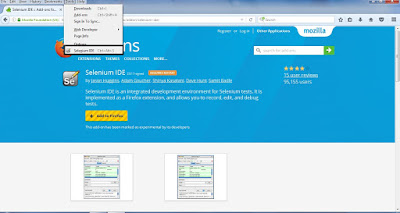 |
| TOOLS>SELENIUM IDE |
 |
| SELENIUM IDE CONSOLE |


![Latest Selenium Interview Questions [Updated 2019]](https://blogger.googleusercontent.com/img/b/R29vZ2xl/AVvXsEiurKIZ53_uoMLjO-Ba0bWidMRDVVhnkqXT9h13xSMx4zldpFAs_CqQKTGBJPAUxc7rkVfxhflm6rT-rcf2kVRAiCkXv0gAmAVchHDgCIxY2r7nxnN7GrzvDnMK8AgYnAOhUibnJG2GLG4g/s72-c/SeleniumInterview.png "Latest Selenium Interview Questions [Updated 2019]")


